
In the ever-evolving world of search engine optimization (SEO), every detail of your WordPress site matters—from content quality to technical setup. One often-overlooked element that can significantly impact your rankings is the permalink structure.
Permalinks are the permanent URLs for your posts, pages, and other content, and choosing the right structure can make your site more user-friendly, easier for search engines to crawl, and ultimately, better positioned in search results like Google.
If you’re building a new WordPress site or optimizing an existing one, getting your permalinks right from the start can save you headaches down the line. In this comprehensive guide, we’ll dive into what permalinks are, the different types available, the absolute best structure for SEO in 2026, how to implement it safely, and expert tips to maximize your rankings. This advice is based on the latest recommendations from SEO authorities and WordPress experts.
What Are WordPress Permalinks?
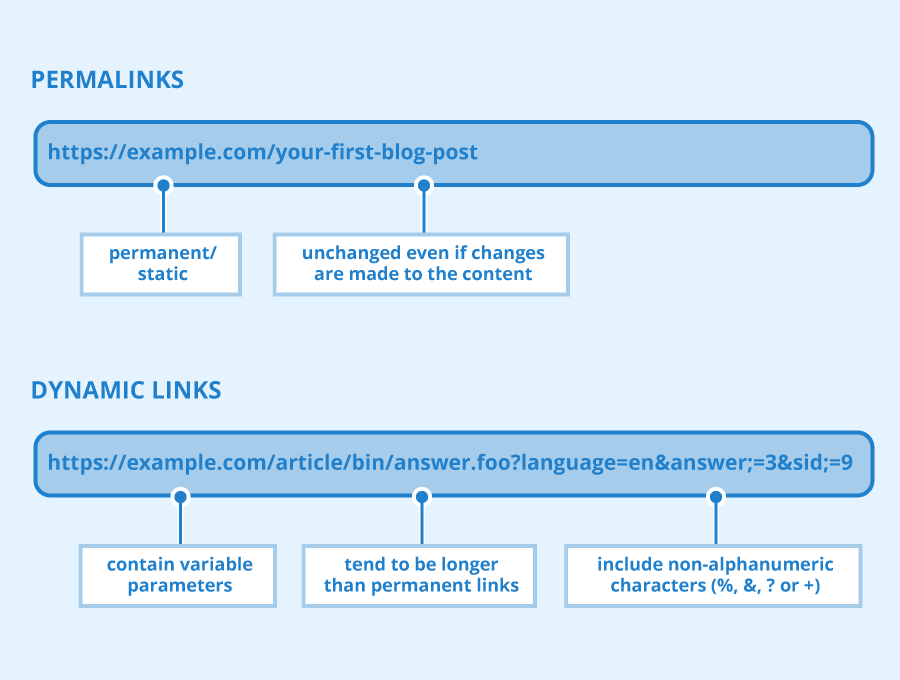
Permalinks, short for “permanent links,” are the fixed URLs that point to specific content on your website. In WordPress, they define the format of URLs for blog posts, pages, categories, tags, and even custom post types like products in WooCommerce. Unlike dynamic URLs that might change, permalinks are designed to be stable and descriptive.
For example:
- A basic page might have a URL like https://yourwebsite.com/about-us/.
- A blog post could be https://yourwebsite.com/best-seo-tips-2026/.
Why do they matter? Well-structured permalinks help search engines understand your content’s topic, improve click-through rates (CTR) in search results, and enhance user experience (UX)—all of which are ranking factors in Google’s algorithm. Poor permalinks, on the other hand, can lead to confusion, duplicate content issues, or even penalties if not handled properly.
WordPress generates permalinks automatically based on your chosen structure, but you can customize them individually for better optimization.
Read Also: Fixing Common AdSense Issues: A Step-by-Step Guide for 2026
Types of Permalink Structures in WordPress
WordPress offers several built-in permalink options under Settings > Permalinks. Here’s a breakdown of the main ones, including their formats and when they might be useful:
| Structure Type | Example URL | Best For | Drawbacks |
|---|---|---|---|
| Plain (Default) | https://yourwebsite.com/?p=123 | Quick testing or internal sites | No keywords; poor for SEO and readability. |
| Day and Name | https://yourwebsite.com/2026/01/26/sample-post/ | News sites where date is crucial | Makes content seem dated; longer URLs reduce shareability. |
| Month and Name | https://yourwebsite.com/2026/01/sample-post/ | Monthly archives or semi-time-sensitive content | Still includes dates, which can hurt evergreen topics. |
| Numeric | https://yourwebsite.com/archives/123 | Database-like sites not focused on traffic | Unmemorable and uninformative for users/search engines. |
| Post Name | https://yourwebsite.com/sample-post/ | Most blogs, businesses, and affiliate sites | Potential for duplicate slugs if not managed (rare). |
| Custom Structure | e.g., /%category%/%postname%/ → https://yourwebsite.com/seo/sample-post/ | Large sites with categories or hierarchies | Can become too long if overused. |
For eCommerce sites using WooCommerce, additional options include shop bases like /shop/product-name/ or /shop/category/product-name/, which help organize product URLs.
The Best Permalink Structure for SEO in 2026
Based on consensus from SEO plugins like AIOSEO, Jetpack, and experts in 2026, the best permalink structure for most WordPress sites is “Post Name” (or /%postname%/ in custom settings). This creates clean, keyword-rich URLs like https://yourwebsite.com/best-wordpress-plugins/.
Why this one?
- SEO Benefits: It places keywords directly in the URL, helping search engines match queries to your content. Google favors descriptive URLs that align with user intent.
- User-Friendly: Short and readable, encouraging higher CTR from search results.
- Evergreen Appeal: No dates mean your content doesn’t appear “old” even years later.
- Flexibility: Works for blogs, service sites, portfolios, and more.
For larger sites with deep hierarchies (e.g., news magazines or eCommerce), opt for a custom structure like /%category%/%postname%/. This adds context without overwhelming the URL. However, for 90% of sites, plain “Post Name” is sufficient and performs best in rankings.
Avoid date-based structures unless your content is strictly time-sensitive (e.g., daily news), as they can deter users seeking timeless advice.
Why “Post Name” Wins: Pros and Cons Compared
Let’s compare “Post Name” to alternatives:
- Pros of Post Name:
- Improves crawlability and indexing by including natural keywords.
- Boosts UX with memorable links, leading to better engagement signals.
- No risk of dated perceptions, ideal for evergreen content like tutorials or reviews.
- Shorter URLs rank better in mobile searches and social shares.
- Cons:
- If two posts have similar titles, WordPress auto-appends numbers (e.g., /sample-post-2/), but this is easily fixed by editing slugs.
Compared to dated structures:
- They highlight recency but can make URLs longer and less appealing over time.
- Numeric or Plain options provide zero SEO value and harm rankings.
In 2026, with Google’s emphasis on E-E-A-T (Experience, Expertise, Authoritativeness, Trustworthiness) and user signals, clean permalinks contribute to perceived quality.
Read Also: Best WordPress SEO Plugins for 2026: Rank Math, Yoast & AIOSEO Compared
How to Set Up or Change Permalinks Safely in WordPress
Setting up the best structure is straightforward, but changes on live sites require caution to avoid breaking links and losing rankings.
- Backup Your Site: Use plugins like Jetpack VaultPress or UpdraftPlus for a full backup.
- Navigate to Settings: Go to Dashboard > Settings > Permalinks.
- Choose Your Structure: Select “Post Name” or enter /%postname%/ in Custom Structure.
- Save Changes: WordPress will update your .htaccess file automatically.
- Set Up Redirects: Install a plugin like Redirection or AIOSEO’s built-in manager. Map old URLs to new ones with 301 redirects to preserve link equity.
- Test and Monitor: Check old URLs in incognito mode. Use Google Search Console to watch for 404 errors.
For individual posts, edit the slug in the post editor under the Permalink section.
Here’s a visual reference of the Permalinks settings page:
If you’re using WooCommerce, adjust product permalinks in the same menu for shop-specific structures.
Best Practices and Tips for Permalink Optimization
To take your SEO further:
- Include Target Keywords: Place your primary keyword in the slug, e.g., seo-friendly-permalinks instead of post-1.
- Use Hyphens, Not Underscores: Hyphens separate words for better readability (Google treats underscores as connectors).
- Keep It Short: Aim for 3-5 words; remove stop words like “the” or “and” if they don’t add value.
- Switch to HTTPS: Secure URLs are a ranking factor—get an SSL certificate if you haven’t already.
- Avoid Frequent Changes: Only update if necessary, and always redirect.
- For Categories: Use them sparingly on large sites to avoid long URLs, but they can help with silo structures.
- Evergreen Focus: Strip dates from slugs for timeless content.
In 2026, integrate this with other SEO elements like fast loading times (Core Web Vitals) and high-quality backlinks for maximum impact.
Common Mistakes to Avoid
- Ignoring redirects after changes, leading to 404s and lost traffic.
- Keyword stuffing in slugs—keep it natural.
- Using special characters or uppercase letters (WordPress converts to lowercase anyway).
- Adding dates to non-news content, reducing perceived relevance.
- Overcomplicating custom structures, which can confuse crawlers.
Read Also: How to Start a Digital Marketing Agency from Scratch in 2026
Conclusion
Choosing the “Post Name” permalink structure is a simple yet powerful step toward better WordPress SEO in 2026. It creates clean, keyword-focused URLs that benefit both users and search engines, potentially boosting your rankings and traffic. Implement it carefully with redirects, follow the best practices outlined here, and pair it with stellar content to see real results.
Ready to optimize? Head to your WordPress dashboard now. If you have questions or need help with your specific niche, drop a comment below!